Website guide / Source linked

Ask Maviter

Find prompts, compare tools and navigate Maviter. AI answers stay inside Maviter's indexed evidence.

Search is freeSign in for five daily AI credits
Never paste passwords, API keys or confidential project material.
MAMakemake.com
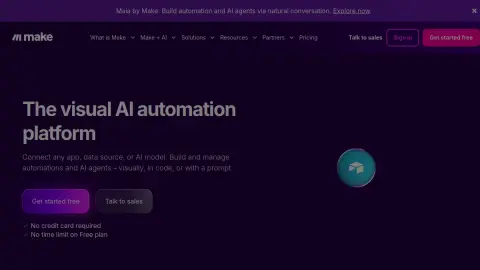
Recent website preview of Make at make.com
Platform previewFor recognition only. Interfaces and offers can change.
Source-backed brief / Review pending

Make

make.com

Make is a visual automation platform where scenarios connect application modules, transform data and route work through conditional branches. Its diagram-first model is useful for understanding operational flow, but reliable production scenarios still require deliberate error handling, queue behaviour, connection ownership and usage-cost monitoring.

Decision brief

Where Make fits

Draw the trigger, data contract, transformations, branches and destination before building the scenario. Use a representative sample, name every module and route, define the fallback and error path, test duplicate and out-of-order events, and monitor operations or credit use before enabling production scheduling.

Strengths / best fit

Consider it when…

  • Business teams automating SaaS data movement and notifications
  • Visual workflows with conditional routing and transformations
  • Webhook or schedule-driven integrations maintained by an operations owner
  • Teams that need reusable guided scenario templates
Cautions / trade-offs

Check carefully when…

  • Unbounded high-volume processing without capacity and cost modelling
  • Sensitive workflows without connection governance and error recovery
  • Large software systems whose core business logic belongs in tested application code
Practical evaluation

Test Make on its real job.

These checks follow the platform-specific brief; complete them before purchase or production use.

  1. 01Map the trigger and payload contract
  2. 02Test every route, filter and fallback
  3. 03Replay duplicate and out-of-order events
  4. 04Measure operations, retries and ownership
Source-backed capabilities / Review pending

What Make contributes.

01Visual module-based scenario construction
02Conditional routers, filters and fallback routes
03Scheduled and webhook-triggered execution
04Reusable public and team scenario templates
05Execution inspection and error-handling controls
Build an account-library pack

No approved Prompt Pack is connected yet.

Start with a guided brief for Make. Maviter keeps the selected platform in context and never exposes private member prompts here.

Important links

Official and disclosed resources.

Commercial destinations are labelled and never influence editorial fit.

Research ledger / Editorial review pending

Official sources behind this brief

These official sources support a distinct working brief, but official documentation is not an independent benchmark. Pricing and consequential claims must still be checked before purchase or production use.

Stay in the category

Alternatives worth comparing.

Build comparison →

Record your Make trial.

Use the profile’s specific evaluation steps with representative, authorised material. Record what happened before deciding whether this tool fits your work.

Open my evaluation worksheet

Your notes stay in this browser tab. Refresh clears them. Nothing is submitted to Make or saved to your Maviter account.

1. Map the trigger and payload contract
2. Test every route, filter and fallback
3. Replay duplicate and out-of-order events
4. Measure operations, retries and ownership